
Originally published on LinkedIn, May 14, 2026.
In a previous article about alt text, SEO, and WCAG, I explored how automation checks for presence—but not purpose.
There’s another layer to remediation.
Some of the most important accessibility gaps won’t appear in automated scans.
When “Everything Passed” Missed the Mark
I’ve worked on sites that passed automated scans—no critical issues flagged—only to uncover meaningful gaps during manual review.
Automated tools are excellent at identifying detectable issues at scale.
But accessibility issues don’t always appear as missing elements or structural failures. Tools can’t fully identify context, clarity, or usability without human review and interpretation.
Where Contextual Detection Begins
Some workflows rely too heavily on automated scans to define “complete.”
That’s where contextual gaps begin to emerge.
Automation can:
- Confirm presence (i.e., whether alt text, headings, landmarks, and other elements exist)
- Flag common issues
- Provide fast visibility
But it cannot:
- Interpret meaning and context
- Validate how content is navigated
- Confirm how a user actually experiences the page
This is where manual validation becomes essential for contextual alignment.
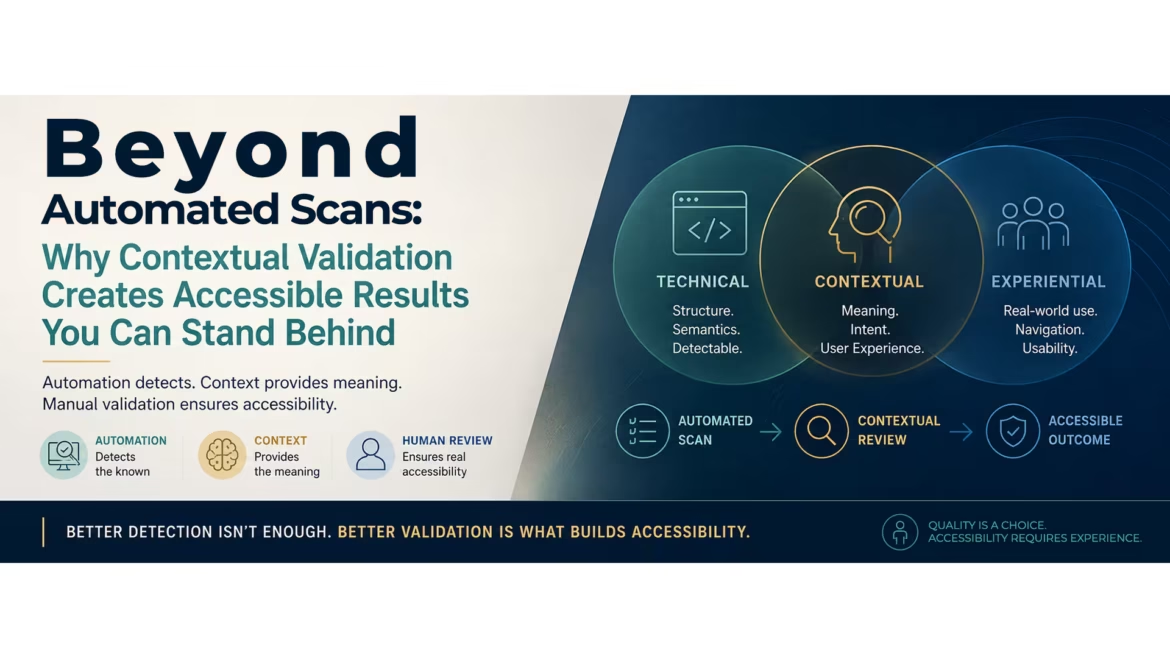
Better detection isn’t enough. Better validation is what builds accessibility.
A Common Example: Alt Text
Alt text was the starting point for my earlier article. Here, it becomes an example of the larger issue: automated checks can confirm that something exists, while contextual review helps determine whether it actually works in practice.
It can exist.
It can pass automated checks.
And still fall short.
Alt text that technically “passes” may:
- Miss the intent and context of the image
- Lack meaningful context
- Be overloaded with keywords
From a system perspective, everything is in place.
From a user perspective, something is missing.
I’ve seen pages pass automated scans with no issues flagged, only to discover during manual review that the alt text technically existed but didn’t actually describe the image in a useful way.
One of the most common patterns, and something I’ve been guilty of myself, is overloading alt text with keywords in an attempt to improve rankings.
But instead of adding value, it creates noise and makes the experience harder for the very users alt text is meant to support.
Beyond Alt Text
Alt text is a clear example—but it’s not the only one.
- A heading hierarchy might pass structural checks — H1, H2, H3 all present — but still fail to guide a screen reader user through the actual logic of the page.
- A landmark structure might exist, but be ordered in a way that makes navigation disorienting for screen reader and assistive technology users.
- Schema may be implemented, but describe relationships so generically that search engines cannot associate meaningful intent.
These are issues that don’t always appear in a scan.
They appear through interaction, navigation, and context.
Accessibility is part of a larger shift happening across digital systems, where presence alone is no longer enough.
Quality, clarity, and contextual meaning increasingly matter just as much as implementation itself.
Technical vs. Experiential Accessibility
One of the biggest gaps in accessibility remediation is the difference between technical accessibility and experiential accessibility.
A page may technically pass automated scans, contain valid structure, and meet detectable technical requirements.
But that doesn’t automatically mean the experience is intuitive, meaningful, or easy to navigate in real use.
Technical accessibility focuses on detectable implementation. Experiential accessibility focuses on contextual usability.
Both matter.
And as accessibility workflows scale, the distinction between the two becomes increasingly important.
Quality Work Is Approached Differently
Quality teams get it: automation alone isn’t enough. They validate manually—from audit and estimation through remediation.
They don’t treat accessibility as a checklist.
They treat it as a process that requires layered validation.
Automated scans identify technical issues quickly. Manual review expands detection into context, usability, and experience.
Quality work typically follows a layered validation process:
- Detect (Automated): Run automated scans to identify detectable issues and establish a technical baseline
- Detect (Manual): Review findings manually to identify contextual, navigational, structural, and usability-related issues that automation may miss
- Compare: Cross-reference automated and manual findings to identify validation gaps
- Hypothesize: Determine root causes and remediation priorities
- Review: Align remediation recommendations with stakeholders and project goals
- Execute: Implement updates and corrective actions
- Validate: Perform QA testing and manual confirmation before deployment
- Publish: Release validated updates into production and continue monitoring
Why This Matters (For Teams & Individual Professionals)
Many accessibility remediation workflows are optimized for speed and efficiency.
As remediation workflows scale, the importance of contextual validation increases.
By contextual validation, I mean reviewing accessibility beyond simple detection—confirming that content, structure, and interaction still make sense in real use.
But accessibility isn’t measured by how fast you can scan—it’s measured by how confidently you can stand behind the result.
Skipping manual validation may create short-term efficiencies and reduce immediate costs, but it can increase downstream remediation efforts and risk.
When issues reach users, it’s not just a technical gap—it becomes a trust issue.
And once trust is impacted, remediation becomes reactive instead of proactive.
Accessibility Requires Experience, Not Just Detection
Accessibility isn’t fully validated when the scan is complete.
It’s validated when the experience holds up.
If quality matters, automation alone isn’t enough.
Manual review is what turns technical detection into meaningful validation you can confidently stand behind.